Olá Usuario(a),
Aqui é a comunidade Apple de usuários ajudando outros usuários iguais a você.
Se a bateria do Mac não carregar completamente - Suporte da Apple (BR)
Reset the SMC of your Mac
The SMC is responsible for managing power on your Mac. Resetting it can resolve certain uncommon issues related to power or thermal management.
Do you need to reset the SMC?
You almost certainly don't need to reset the SMC, but resetting the SMC may be suggested for Intel-based Mac computers as a final step to resolve issues that could be power related:
If your Mac is experiencing one of these issues, follow the steps in this article for your Mac model:
Mac with Apple silicon
Mac with Apple T2 Security Chip
All other Mac models
If you have Mac with Apple silicon
Find out if you have a Mac with Apple silicon
Make sure that your Mac is plugged into power, then take one of these actions.
- Restart: Choose Apple menu > Restart.
- Or shut down: Choose Apple menu > Shut Down. Then press the power button on your Mac to turn it on again.
No other steps are necessary for Mac computers with Apple silicon.
If you have a Mac with the Apple T2 chip
Find out if you have a Mac with the Apple T2 Security Chip
Laptop computer with the T2 chip
Before resetting the SMC, follow these steps:
- Shut down your Mac, if possible.
- Press and hold the power button for 10 seconds, then release the button. (Every Mac has a power button. On laptop computers that have Touch ID, press and hold Touch ID.)
- Wait a few seconds, then press the power button to turn on your Mac.
If the issue persists, reset the SMC:
- Shut down your Mac.
- On your built-in keyboard, press and hold all of the following keys. Your Mac might turn on.
- Control
 on the left side of your keyboard
 - Option (Alt)
 on the left side of your keyboard
 - Shift
 on the right side of your keyboard
- Keep holding all three keys for 7 seconds, then press and hold the power button as well. If your Mac is on, it will turn off as you hold the keys.
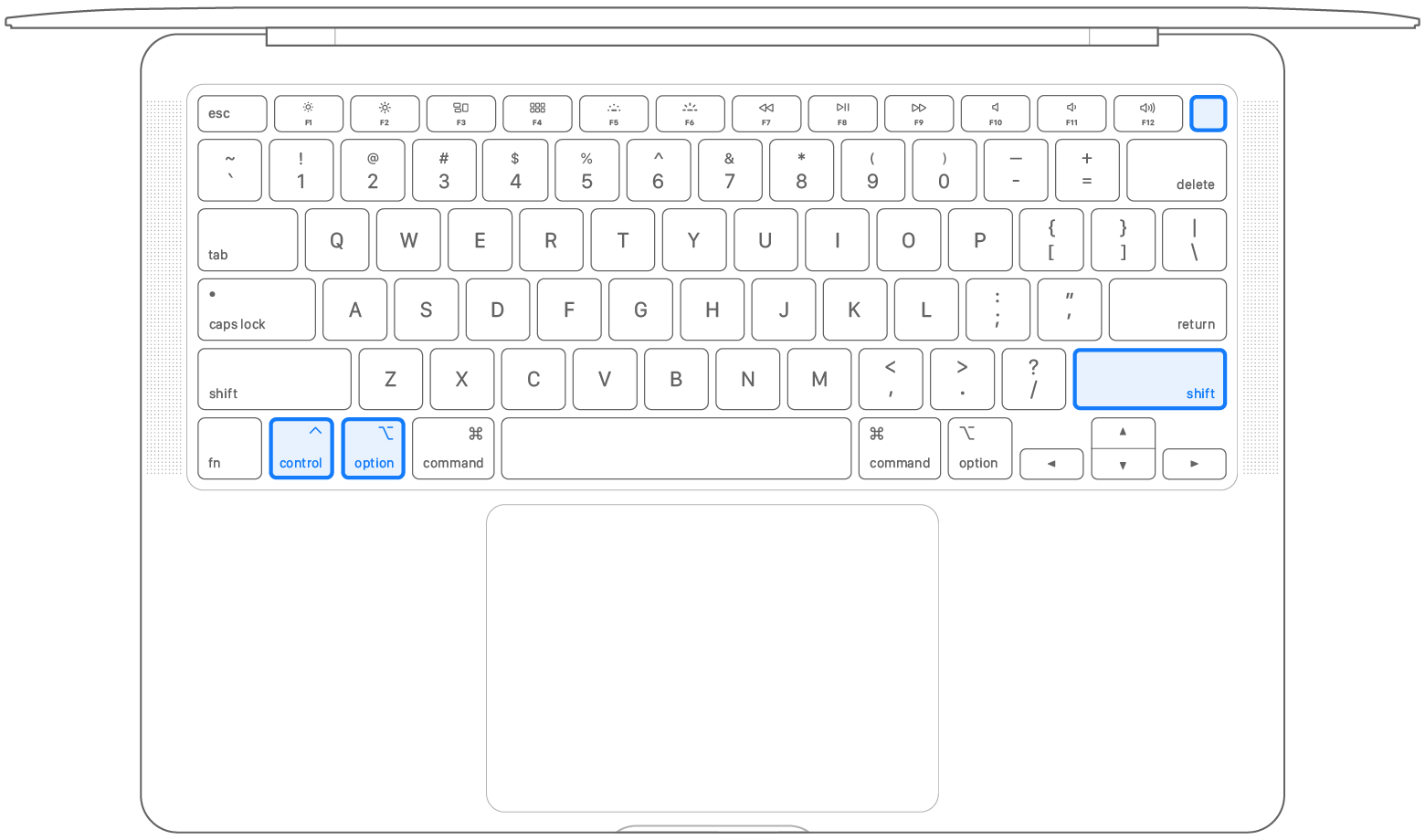
- Keep holding all four keys for another 7 seconds, then release them.
- Wait a few seconds, then press the power button to turn on your Mac.
Desktop computer with the T2 chip
If your Mac isn't a laptop computer, follow these steps:
- Shut down your Mac, then unplug the power cord.
- Wait 15 seconds, then plug the power cord back in.
- Wait 5 seconds, then press the power button to turn on your Mac.
If you don't have a Mac with Apple silicon or the T2 chip
Follow these steps on older computers that have neither Apple silicon nor the Apple T2 Security Chip.
Laptop computer
- Shut down your Mac.
- On your built-in keyboard, press and hold all of these keys:
- Shift on the left side of your keyboard
- Control on the left side of your keyboard
- Option (Alt) on the left side of your keyboard
- While holding all three keys, press and hold the power button as well.
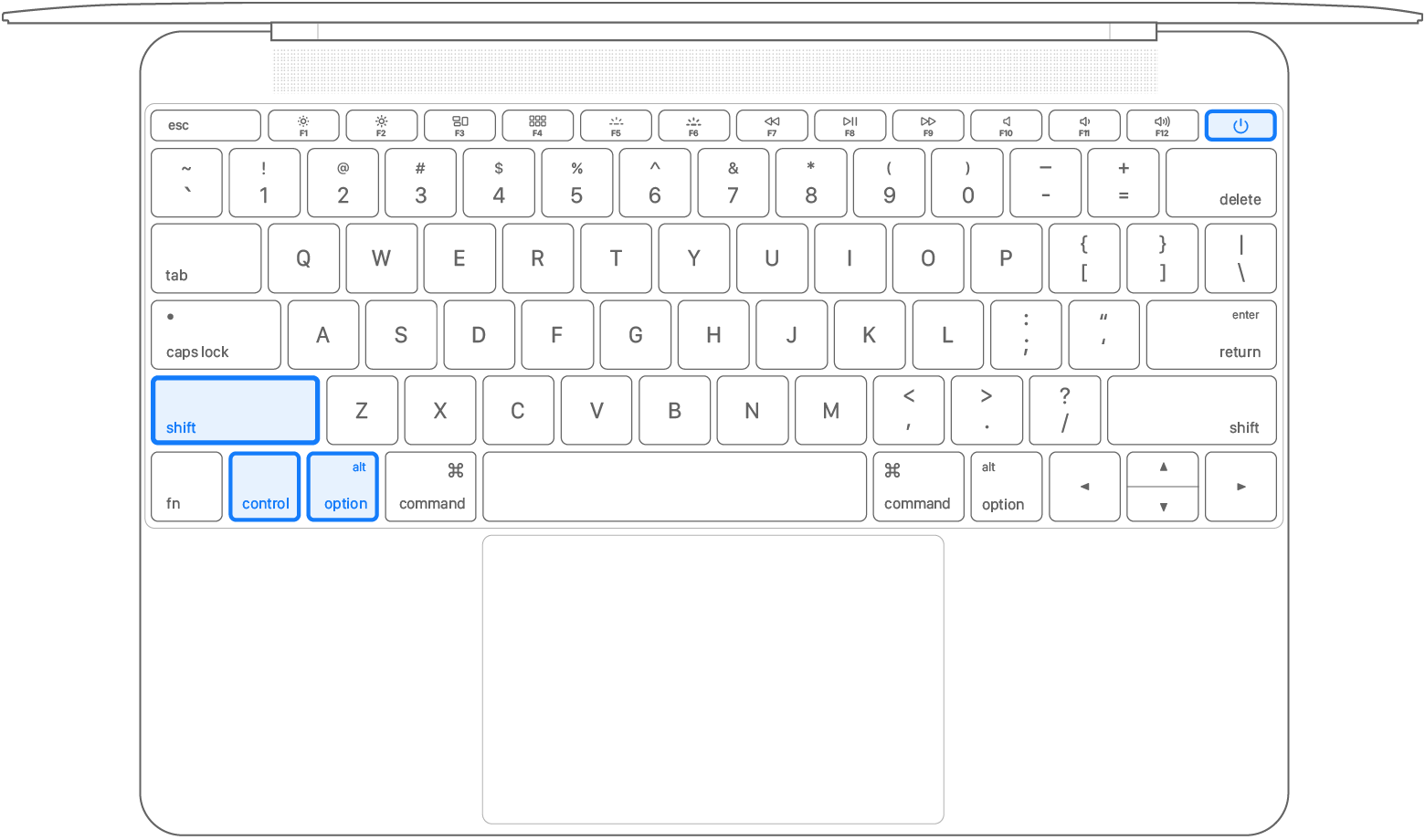
- Keep holding all four keys for 10 seconds.
- Release all keys, then press the power button to turn on your Mac.
Desktop computer
If your Mac isn't a laptop computer, follow these steps:
- Shut down your Mac, then unplug the power cord.
- Wait 15 seconds, then plug the power cord back in.
- Wait 5 seconds, then press the power button to turn on your Mac.
https://support.apple.com/en-us/102605?displayMode=headless
Se minha orientação/ajuda foi útil, não deixe de curti
Espero ter ajudado!
Atenciosamente
Dav3 G®️0hl666
Este site apresenta conteúdos enviados por usuários, comentários e opiniões apenas para fins de informação. A Apple poderá fornecer ou recomendar respostas como uma solução possível com base nas informações fornecidas. Cada possível problema poderá envolver diversos fatores não especificados nas conversas capturadas em um fórum eletrônico; sendo assim, a Apple não pode garantir a eficácia de quaisquer soluções sugeridas nos fóruns da comunidade. A Apple isenta-se de toda e qualquer responsabilidade por atos, omissões e conduta de terceiros em conexão com o uso do site ou relacionados a ele. Todas as publicações e todo o uso de conteúdo do site estão sujeitas aos Termos de Uso da Comunidade de Suporte da Apple. Veja como os seus dados são gerenciados…