Câmera do iPhone com reflexo de luz

ola!

apos a atualizacao minha camera comecou a ter reflexos na luz, como ajustar?


[Título alterado pelo Moderador] Título Original: Camera com Reflexo de Luz

iPhone 15

Publicado em 2/04/2026 15:12

Responder
1 resposta

6/04/2026 07:13 em resposta a NayaraMoraes

Olá Usuario(a), Aqui é a comunidade Apple de usuários ajudando outros usuários iguais a você. Isso sempre teve e nao ha " ajuste " a ser feito, a nao ser um curso básico de fotografia


Motion: Lens Flare


Lens Flare generator in Motion

Lens flares result from a bright light source pointed right at a lens, refracting off multiple elements in the lens assembly of a camera. This generator adds a simulated lens flare.
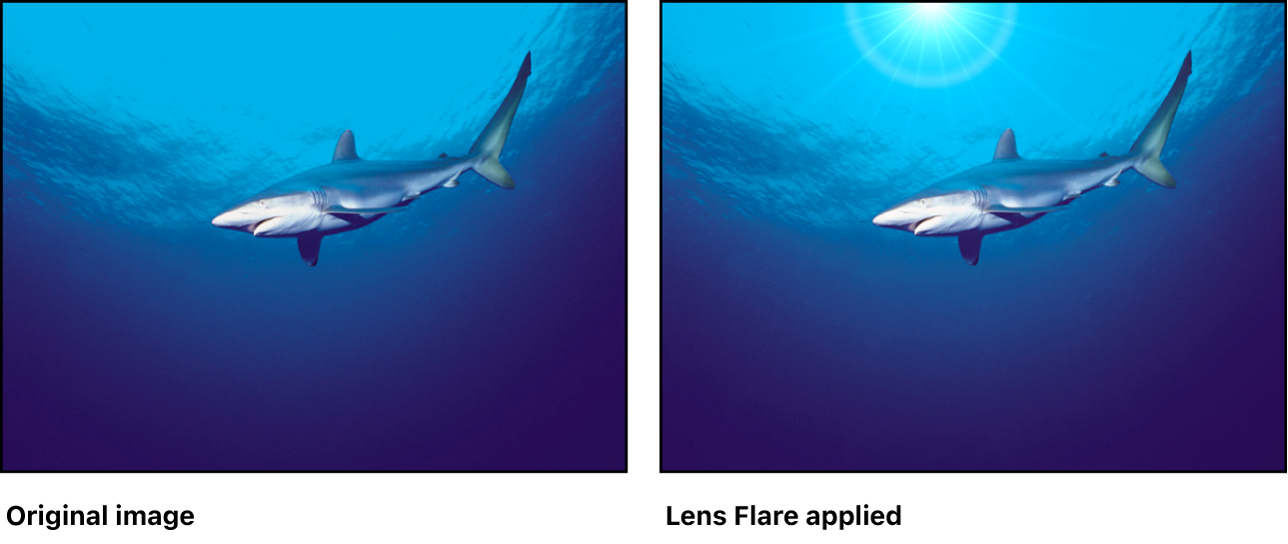
Adjust this generator using the controls in the Generator Inspector:


  • Center: Value sliders that set the position of the center of the lens flare. (You can also use the Adjust Item tool to modify this parameter with onscreen controls. See Modify or animate a generator.)

  • Size: A slider that sets the radius of the ring of the lens flare.

  • Intensity: A slider that sets the intensity of the lens flare. Values range from 0 to 4.

  • Falloff: A slider that sets how fast the lens flare falls off. Values range from 0 to 10.

  • Color: Color controls that pick the color of the lens flare. Click the disclosure triangle to display Red, Green, and Blue sliders for more precise color selection.

  • Outer Color: Color controls that pick the outer color of the lens flare.

  • Ring Color: Color controls that pick the color of the ring of the lens flare.

  • Streak Color: Color controls that pick the color of the streaks in the lens flare.

  • Streak Intensity: A slider that sets the intensity of the streaks. Values range from 0 to 1.

  • Streak Count: A slider that sets the number of streaks in the lens flare. Values range from 1 to 100.

  • Streak Noise Frequency: A slider that sets the frequency of the noise in the streaks. Values range from 1 to 100.

  • Streak Noise Level: A slider that sets the level of noise in the streaks of the lens flare. Values range from 0 to 20.

  • Ring Radius: A slider that sets the radius of the ring of the lens flare. Values range from 0 to 1.

  • Ring Width: A slider that sets the ring’s width. Values range from 0 to 1.

  • Glow Falloff: A slider that sets how fast the glow falls off of the lens flare. Values range from 0 to 20.

  • Streak Map: An image well that displays a thumbnail of the map chosen for the streaks of the lens flare.

  • Publish OSC: A checkbox that, when selected, ensures that if this generator is sent to Final Cut Pro as part of a template, the onscreen controls are accessible in Final Cut Pro. For more information about publishing onscreen controls and other parameters, see Intro to Final Cut Pro templates.

Download this guide: PDF Se minha orientação/ajuda foi útil, não deixe de curti Espero ter ajudado! Atenciosamente Dav3 G®️0hl666 Este site apresenta conteúdos enviados por usuários, comentários e opiniões apenas para fins de informação. A Apple poderá fornecer ou recomendar respostas como uma solução possível com base nas informações fornecidas. Cada possível problema poderá envolver diversos fatores não especificados nas conversas capturadas em um fórum eletrônico; sendo assim, a Apple não pode garantir a eficácia de quaisquer soluções sugeridas nos fóruns da comunidade. A Apple isenta-se de toda e qualquer responsabilidade por atos, omissões e conduta de terceiros em conexão com o uso do site ou relacionados a ele. Todas as publicações e todo o uso de conteúdo do site estão sujeitas aos Termos de Uso da Comunidade de Suporte da Apple. Veja como os seus dados são gerenciados…

Câmera do iPhone com reflexo de luz

Bem-vindo à Comunidade de Suporte da Apple
Um fórum onde os clientes da Apple ajudam uns aos outros com seus produtos. Use sua conta Apple para começar.