Como actualizar iOS

No puedo actualizar iOS y me urge ,no me da la opción de actualizarlo


[Título gestionado por un moderador]

iPhone 8 Plus, iOS 16

Publicado el 26/08/2024 01:12 p.m.

Responder
Pregunta marcada como Respuesta mejor clasificada

Publicado el 26/08/2024 06:05 p.m.

Use your Windows device to update software on your iPhone, iPad, or iPod touch

Using your Windows device, you can update software on your iPhone, iPad, or iPod touch.


  1. Connect your Apple device to your Windows device.
  2. You can connect your device using a USB or USB-C cable or a Wi-Fi connection. See Sync content between your Windows device and iPhone, iPad, or iPod touch over Wi-Fi.
  3. In the Apple Devices app  on your Windows device, select the device in the sidebar.
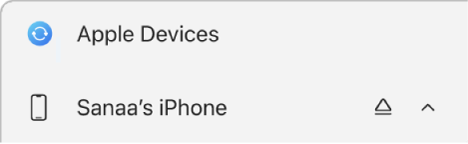
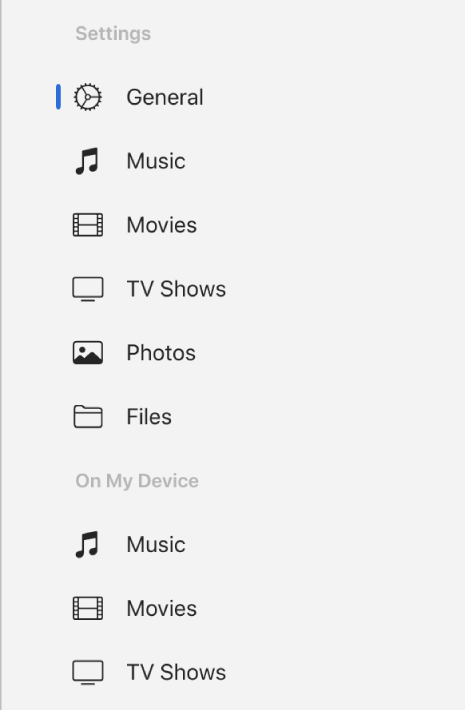
  4. If you connect your Apple device to your Windows device using a USB or USB-C cable and don’t see the device in the sidebar, see If your iPhone, iPad, or iPod doesn’t appear in the sidebar.
  5. Select General in the sidebar.
  6. Select Update.
  7. Note: You may need to first select Check for Update to see if an update is available. If an update is available, the Update button appears.


3 respuestas
Pregunta marcada como Respuesta mejor clasificada

26/08/2024 06:05 p.m. en respuesta a Maxiroger-

Use your Windows device to update software on your iPhone, iPad, or iPod touch

Using your Windows device, you can update software on your iPhone, iPad, or iPod touch.


  1. Connect your Apple device to your Windows device.
  2. You can connect your device using a USB or USB-C cable or a Wi-Fi connection. See Sync content between your Windows device and iPhone, iPad, or iPod touch over Wi-Fi.
  3. In the Apple Devices app  on your Windows device, select the device in the sidebar.
  4. If you connect your Apple device to your Windows device using a USB or USB-C cable and don’t see the device in the sidebar, see If your iPhone, iPad, or iPod doesn’t appear in the sidebar.
  5. Select General in the sidebar.
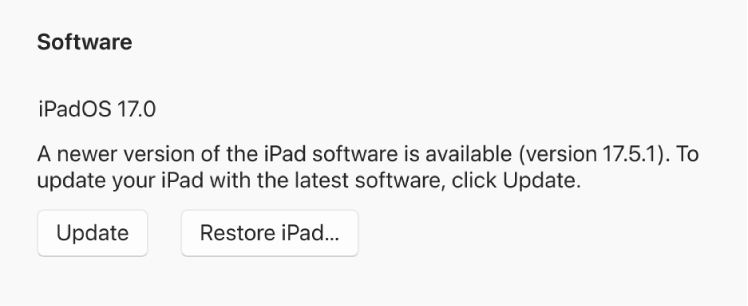
  6. Select Update.
  7. Note: You may need to first select Check for Update to see if an update is available. If an update is available, the Update button appears.


Este debate ha sido cerrado por el sistema o por el equipo de la Comunidad. Puedes votar por el contenido que consideres útil o buscar respuestas adicionales en la Comunidad.

Como actualizar iOS

Bienvenido a la Comunidad de soporte de Apple
Un foro donde los clientes de Apple se ayudan entre sí con sus productos. Comienza con tu cuenta de Apple.