Aparecem duas luas no céu ao fotografar com o iPhone

Pessoal, tenho um Iphone 15 PRO e reparei quando quando vou tirar uma foto da lua, ele acaba duplicando. Fico com duas luas: Uma mais definida e a outra uma bola de luz rs. E normal isso? Como posso resolver?


[Título alterado pelo Moderador]

Windows, Windows 10

Publicado em 12/05/2024 15:27

Responder
Pergunta marcada como Resposta melhor classificada

Publicado em 13/05/2024 10:41

Olá!


Este efeito ocorre devido a um fenômeno físico que acontece dentro da câmera. Quando a luz do objeto passa pela lente, ela alcança o sensor (objeto mais brilhante), mas parte dessa luz é refletida pela própria lente e alcança o sensor novamente (objeto menos brilhante), fazendo com que o objeto pareça duplicado. Desenhei um esquema bem simples para explicar como isso pode ocorrer em alguns tipos de lentes:
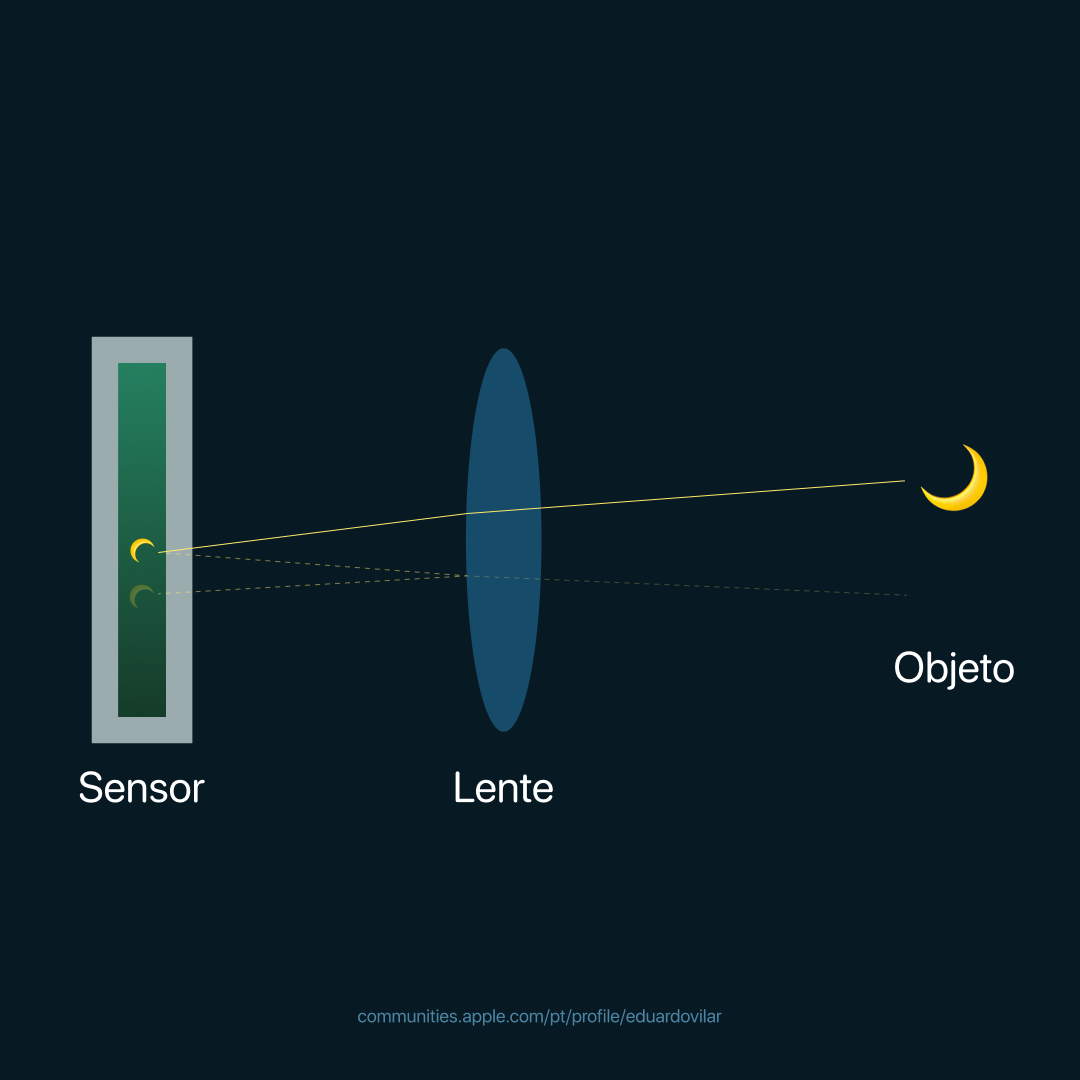

Entenda mais: Lens Flare (Wikipedia).


Para evitar isso, você pode evitar fotografar ambientes onde a diferença de intensidade de luz seja muito grande, ou você pode comprar algum filtro específico que ajude a evitar este efeito na foto final.


Espero ter ajudado. Até mais!

5 respostas
Pergunta marcada como Resposta melhor classificada

13/05/2024 10:41 em resposta a ericktostes

Olá!


Este efeito ocorre devido a um fenômeno físico que acontece dentro da câmera. Quando a luz do objeto passa pela lente, ela alcança o sensor (objeto mais brilhante), mas parte dessa luz é refletida pela própria lente e alcança o sensor novamente (objeto menos brilhante), fazendo com que o objeto pareça duplicado. Desenhei um esquema bem simples para explicar como isso pode ocorrer em alguns tipos de lentes:


Entenda mais: Lens Flare (Wikipedia).


Para evitar isso, você pode evitar fotografar ambientes onde a diferença de intensidade de luz seja muito grande, ou você pode comprar algum filtro específico que ajude a evitar este efeito na foto final.


Espero ter ajudado. Até mais!

13/05/2024 07:09 em resposta a ericktostes

Olá Usuario(a), Aqui é a comunidade Apple de usuários ajudando outros usuários iguais a você. Motion: Lens Flare


Lens Flare generator in Motion

Lens flares result from a bright light source pointed right at a lens, refracting off multiple elements in the lens assembly of a camera. This generator adds a simulated lens flare.

Adjust this generator using the controls in the Generator Inspector:


  • Center: Value sliders that set the position of the center of the lens flare. (You can also use the Adjust Item tool to modify this parameter with onscreen controls. See Modify or animate a generator.)

  • Size: A slider that sets the radius of the ring of the lens flare.

  • Intensity: A slider that sets the intensity of the lens flare. Values range from 0 to 4.

  • Falloff: A slider that sets how fast the lens flare falls off. Values range from 0 to 10.

  • Color: Color controls that pick the color of the lens flare. Click the disclosure triangle to display Red, Green, and Blue sliders for more precise color selection.

  • Outer Color: Color controls that pick the outer color of the lens flare.

  • Ring Color: Color controls that pick the color of the ring of the lens flare.

  • Streak Color: Color controls that pick the color of the streaks in the lens flare.

  • Streak Intensity: A slider that sets the intensity of the streaks. Values range from 0 to 1.

  • Streak Count: A slider that sets the number of streaks in the lens flare. Values range from 1 to 100.

  • Streak Noise Frequency: A slider that sets the frequency of the noise in the streaks. Values range from 1 to 100.

  • Streak Noise Level: A slider that sets the level of noise in the streaks of the lens flare. Values range from 0 to 20.

  • Ring Radius: A slider that sets the radius of the ring of the lens flare. Values range from 0 to 1.

  • Ring Width: A slider that sets the ring’s width. Values range from 0 to 1.

  • Glow Falloff: A slider that sets how fast the glow falls off of the lens flare. Values range from 0 to 20.

  • Streak Map: An image well that displays a thumbnail of the map chosen for the streaks of the lens flare.

  • Publish OSC: A checkbox that, when selected, ensures that if this generator is sent to Final Cut Pro as part of a template, the onscreen controls are accessible in Final Cut Pro. For more information about publishing onscreen controls and other parameters, see Intro to Final Cut Pro templates.

Se minha orientação/ajuda foi útil, não deixe de curti Espero ter ajudado! Atenciosamente Dav3 G®️0hl666

Esta conversa foi encerrada pelo sistema ou pela equipe da comunidade. Você pode votar em quaisquer publicações que considerar úteis ou pesquisar outras respostas na Comunidade.

Aparecem duas luas no céu ao fotografar com o iPhone

Bem-vindo à Comunidade de Suporte da Apple
Um fórum onde os clientes da Apple ajudam uns aos outros com seus produtos. Use sua conta Apple para começar.